
Transferring a domain
If you already have a domain name registered with another web hosting company or domain registrar, you can transfer it to HPD Hosting. When you transfer a domain, its billing and administration also move to HPD Hosting.
Ensuring a smooth transfer
You can start the domain transfer process when you first sign up as an HPD Hosting customer, or at a later time as an existing customer. In either case, to make sure the transfer process goes as smoothly as possible:
- The domain must be unlocked. If you need assistance unlocking your domain, contact the domain's current registrar.
- The domain's contact information must be current. A domain name record contains an Administrative Contact and a Technical Contact. Both of these contacts can be the same person, but at least one of them should be you. When a domain transfer request is initiated, the Administrative Contact and Technical Contact are notified by e-mail.
Additionally, if your domain has WHOIS privacy protection enabled, you should temporarily disable it before the migration. Doing this helps ensure that you receive the domain transfer verification e-mail message.
- You must obtain an EPP (Extensible Provisioning Protocol) code from the current registrar or hosting company. This code is an identifying number for the domain that indicates you are authorized to transfer it. In some cases, there may be a time delay between when the domain is initially registered and when it can be transferred.
If you are unsure what your EPP code is, or how to find it, contact the domain's current registrar. The EPP code may also be called an EPP key, an AuthInfo code, a transfer secret, or something similar.
- Shared web hosting customers should use A2 Hosting's name servers.
When you initiate the domain transfer process, HPD Hosting sends a domain transfer request to the domain's Administrative and Technical contacts. The amount of time to complete the domain transfer depends in large part on how quickly these contacts approve the transfer request. If the Administrative or Technical contact approves the authorization promptly, the domain may be transferred in as little as 2 to 4 days.
Transferring a non-United States domain
If you have a non-United States domain name (such as .co.uk or .org.uk), some additional steps may be required to transfer the domain. For example, .uk domain transfers are a “push and pull” process. You must initiate a transfer request with HPD Hosting and submit a request to the losing (current) registrar. In your request to the losing registrar, ask them to retag the domain name to the IPS tag ENOM.
For other non-United States domain names, please contact your registrar for information about how to transfer your domain.
Initiating the domain transfer
To begin the domain transfer process, follow these steps:
- Log in to the Customer Portal.
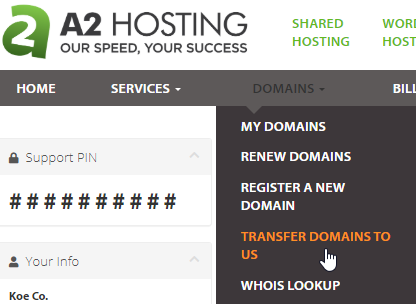
- On the menu bar, click Domains, and then click TRANSFER DOMAINS TO US:
- In the text box, type the name of the domain that you want to transfer, and then click .
- Click .
- On the Domains Configuration page, type the EPP code and select the options you want.
- Click . The Review & Checkout page appears.
- Click . The Checkout page appears. If you have an HPD Hosting account and are logged in, the personal and billing information appears automatically. Otherwise, complete the fields.
- Under Payment Details, select the payment method that you want to use.
- Select the I have read and agree to the Terms of Service check box.
- Click .
What to do if a domain transfer is unsuccessful
If a domain transfer is unsuccessful, you have two options:
- You can have HPD Hosting attempt to transfer the domain again. If you want to do this, please do not order another domain transfer through our web site. Instead, open a support ticket with the transfer request.
- Alternatively, you can update the domain's name server settings to point to A2 Hosting's name servers.
